Stop drowning in due dates.
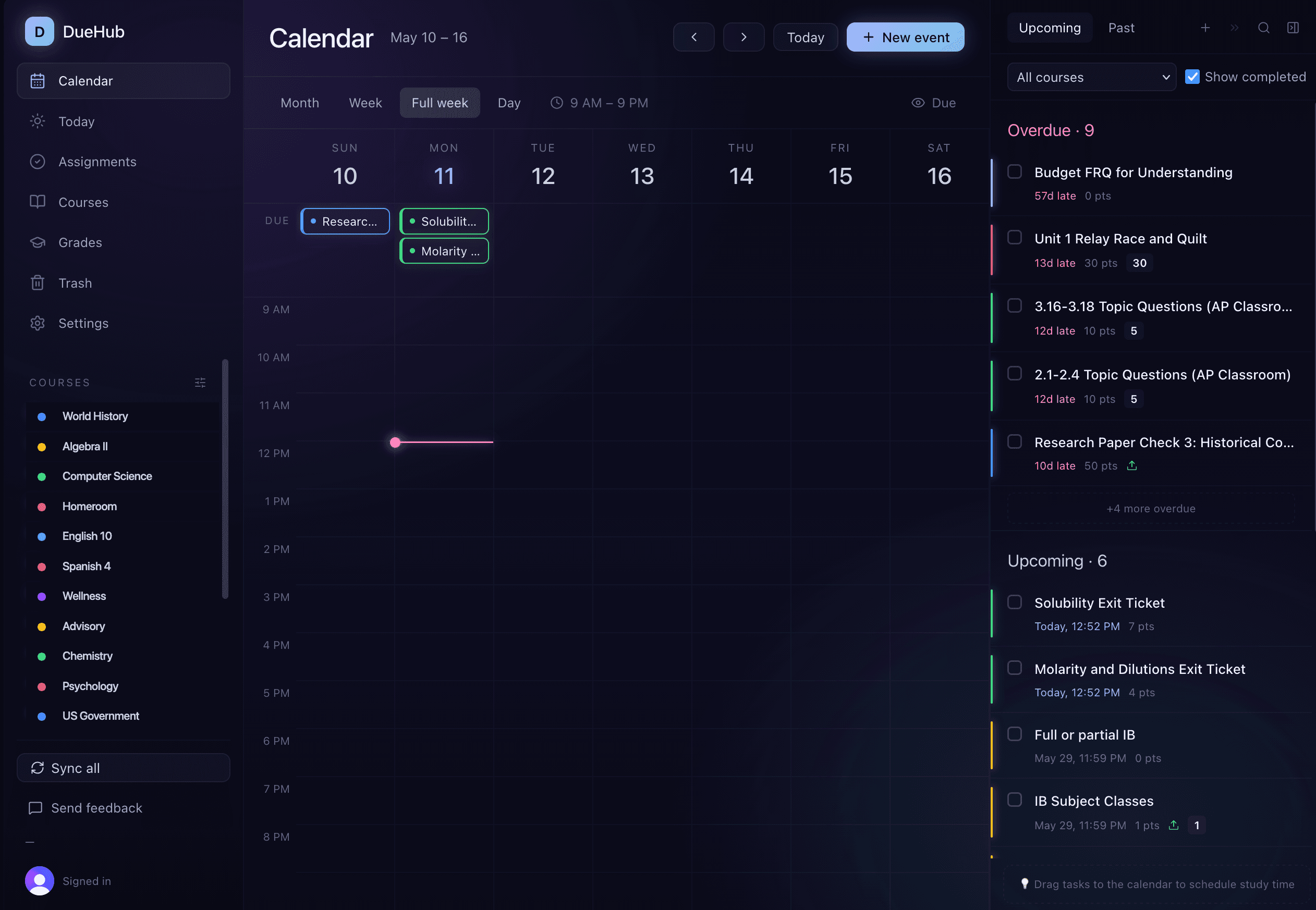
DueHub pulls every assignment from Canvas and StudentVUE into one calm calendar. See what's due, what's overdue, and what's coming — without opening six tabs. School is a lot. Your planner shouldn't be.
Works with the platforms your school already uses
Every assignment. Every class. One calm place.
DueHub is built around how students actually work — with honest tools for planning, tracking, and finishing what's due.
Auto-sync from Canvas & StudentVUE
Connect once, then forget about it. DueHub quietly pulls new assignments, grade updates, and due date changes in the background — so you're never caught off guard by a class you forgot to check.
Unified calendar across every course
Six classes, four platforms, one calendar. Drag assignments onto days you'll actually work on them — DueHub keeps your due dates and your plans in lockstep.
Grade tracking
See where every class stands at a glance.
Bounce back from overdue
Missed a due date? DueHub doesn't shame you — it surfaces what's overdue, helps you prioritize, and lets you reschedule without guilt.
Tasks that aren't from school
Add your own to-dos alongside assignments — study sessions, practice, reading — anything you want to get done this week.
Up and running in under a minute.
No setup headaches, no messy imports. Sign in once and DueHub does the rest.
Connect your accounts
Sign in with your school Canvas credentials or StudentVUE. DueHub securely connects — no syncing files, no manual entry.
Everything appears, organized
Every assignment across every class lands in your calendar, color-coded by course. Past, present, upcoming — all visible at a glance.
Finish what's due
Drag assignments onto the days you'll work on them. Check them off as you go. Watch your overdue count drop to zero — and stay there.
Designed for focus, built for students.
DueHub feels more like your favorite app than a clunky school tool. Dark by default. Thoughtful by design.
A view for every mood
Switch between week, day, or grouped-by-course views. DueHub adapts to how you want to see your workload.
Drag to plan, click to finish
Move an assignment from "Due Dates" to "To-Do" to schedule when you'll actually do it. Check it off when it's done.
Friendly by default
Overdue isn't a red wall of shame. It's a gentle nudge, with every tool you need to catch up.
Why DueHub asks for your permissions.
DueHub only requests the access it needs to deliver the features above. We never sell your data, share it with advertisers, or use it to train AI models.
Google Calendar (read)
Google Calendar (write, opt-in per session)
Google account identity
Canvas LMS
StudentVUE
Sign-in (Clerk)
You can disconnect any integration from Settings → Connections; doing so deletes DueHub's stored copy of data from that source. Full details, retention windows, and deletion paths are in our Privacy Policy.
Your semester, sorted.
Connect Canvas and StudentVUE in under a minute. See everything that's due. Breathe easier. We got you.